The Chrome browser and Google Workspace can work together in several ways.
These connections will help you create and find documents more easily. They will save you mouse clicks.
The following tips also work for consumer Gmail accounts.


Google Sheets is Google’s free, cloud-based spreadsheet application. It runs entirely in a web browser, stores files on Google Drive, saves every change automatically, and lets several people edit the same spreadsheet at the same … Read more →

A Google Workspace user can have multiple email aliases. In combination with Gmail plus addressing, this means unlimited email addresses.

Whether your company is a small local B2C business or a large B2C company, it’s worth paying attention to your Google Business Profile (GBP) listing. According to Google, you can have a business profile if … Read more →

Many small businesses lack the in-house resources to implement and support Google Workspace properly. The IT departments in mid-sized businesses and enterprises often need third-party assistance with WorkSpace due to other commitments. SMBs and enterprise-level … Read more →

Google Sites is not necessarily the first application that has entered most people’s minds as a platform for building a corporate website. However, there are several Google Sites use cases that individuals and organizations can … Read more →
Google Tables is a product that originated in Area 120. No, Area 120 is not a place in the Nevada desert where aliens are studied. It’s the name for Google’s in-house incubator. Tables was launched … Read more →

Here are two ways to insert a superscript into Google Docs. 1. Highlight a character and then select Format > Text > Superscript from the menu. 2. Highlight a character. Click Ctrl + . on … Read more →
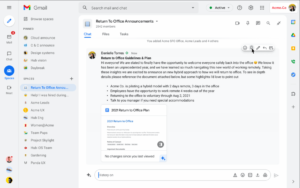
At the 2021 Google I/O, Google announced that Rooms in Google Chat will be rebranded “Spaces” and will get a number of enhancements. Spaces appears to be a viable alternative to Slack (which is in … Read more →
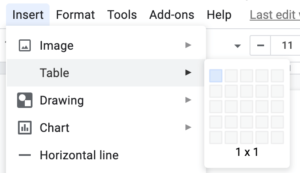
According to Wikipedia, “a typical text box is a rectangle of any size, possibly with a border that separates the text box from the rest of the interface.” In a document, as on a web … Read more →
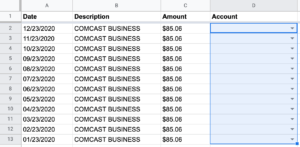
Update: on December 8, 2022, Google introduced drop-down chips in Google Sheets, which vastly simplifies the process described below. One aspect of spreadsheets that makes them different from database applications is that it’s more difficult … Read more →
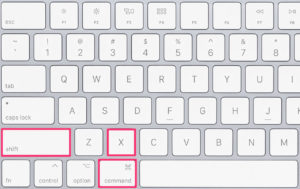
To strikethrough text in Google Docs, highlight the text and press Alt + Shift + 5 on Windows or Chromebook, or ⌘ + Shift + X on a Mac. You can also highlight the text … Read more →

When using Google Meet for your business meetings, an office background will give you a more professional look than, say, a background of a beach or a forest. Google added a feature to Google Meet … Read more →

In many businesses, the marketing department signs up for various Google services. These services include: Companies not using Google Workspace need to set up access to these Google services via an individual (consumer) Google account. … Read more →

Here are the differences between the consumer version of Google Meet and the versions included with Google Workspace (business) editions.

Because Google has a sophisticated general search engine, there is an associated searching benefit to users of Gmail for Business (Google Workspace) and consumer Gmail users. That benefit is a set Gmail search operators that … Read more →

Google Voice for business is a cloud phone system for Google Workspace customers. It’s ideal for a distributed workforce.
There are several Google Docs default Preferences that you may want to change, depending on how you use Google Docs.

If you’re using Google Workspace or considering Workspace for your organization, you may have questions about Google Workspace security in your mind. After all, company email and business documents (if you are leveraging Google Drive … Read more →

Google Workspace Essentials can be viewed as a slimmed-down version of Google Workspace. It includes Google Docs, Sheets, Slides, Drive, Meet, Chat, Sites, Forms, and Keep. However, this version does not host your company … Read more →

Why an organization would want to have multiple domains associated with their Google Workspace account. One way to add additional domains.

Google Meet & Zoom the two most used online meeting apps. Here’s a comparison between the two that goes beyond a two column table.
Long before the pandemic forever changed where and how many of us work, Matt Matt Mullenweg, co-founder of WordPress had developed a 100% distributed workforce at his company Automattic. Automattic is “distributed first.” The idea … Read more →

There are several cases in which you may want to remove duplicate rows from a list of records using Google Sheets. For example, you might want to remove duplicate records before importing a list of … Read more →
There are more similarities between free, consumer Gmail and Google Workspace than there are differences. In fact, Google Workspace can be viewed as a multi-user version of consumer Gmail. When a single-user platform becomes multi-user, … Read more →
The Chrome browser and Google Workspace can work together in several ways.
These connections will help you create and find documents more easily. They will save you mouse clicks.
The following tips also work for consumer Gmail accounts.
Gmail, Google Workspace, Google Sheets, Google Docs, Google Slides, Google Meet, Google Drive, and Google Sites are registered trademarks of Google LLC.