

Short answer
Google Workspace Studio is Google's no-code tool for automating work inside Gmail, Chat, Drive, and the other Workspace apps. You describe a task in plain language, and Gemini builds a flow for it. Two updates started rolling out on November 9, 2026: a Wait until step that can pause a flow for up to 14 days, and skills, which are reusable instructions that teach Gemini how your team works.
Key takeaways
- Studio is included with Google Workspace Business and Enterprise plans. There's nothing extra to buy.
- Wait until lets one flow run a multi-day sequence, like a check-in three days after a welcome email.
- Flows can use skills, and skills can start flows.
- You can't add new "Ask a Gem" steps to flows anymore. Skills replace them.
New to Workspace? Here's how to start the 14-day free trial.
Every small team has chores that come back every week. Filing invoices in Drive is one. Reminding a new hire to finish a form is another. Google Workspace Studio is built for that kind of work.
Studio grew out of an early alpha Google called Workspace Flows, and it's now generally available on all Business and Enterprise plans. Google's own pitch is "AI-powered automation, made simple." We'd call it Zapier-style automation built into Workspace, with Gemini doing the reading and writing. Below is how it works and what the two November updates change.
What is Google Workspace Studio?
Studio is where you design, manage, and share flows in Google Workspace. A flow is an automation. It starts with a starter (the trigger) and runs a series of steps. You open it at studio.workspace.google.com and sign in with your Workspace account.
The quickest way to build one is to describe what you want. According to Google's Workspace Studio page, Gemini 3 turns that description into a flow. You can also assemble prebuilt steps yourself or start from a template.
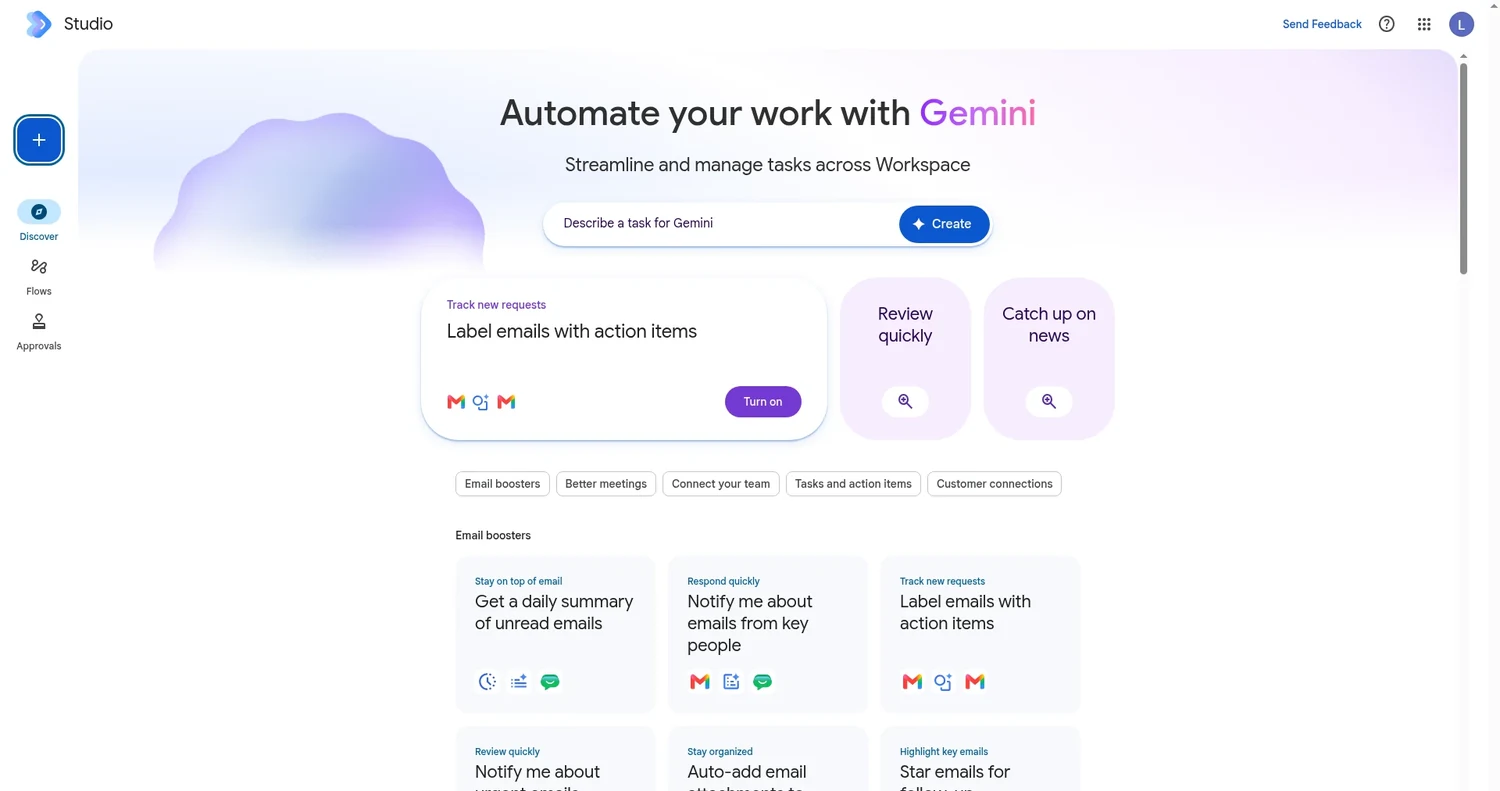
Flows don't stay locked inside Studio. Google says you can change them and track their activity from Gmail, Chat, and Drive. Prebuilt connectors and custom extensions reach the other business apps you use.
What can a flow do?
Google's templates give a good sense of the everyday jobs Studio handles:
- Get a daily summary of unread emails
- Get notified about emails from key people
- Label emails that have action items
- Send email summaries and action items after meetings
- Save attachments to a Drive folder and record them in Sheets
Logic steps let a flow do more than react to one trigger. The Workspace Studio Help Center lists four of them. Check if tests a condition. Filter a list narrows results. Repeat for each loops through items. Wait until is the newest.
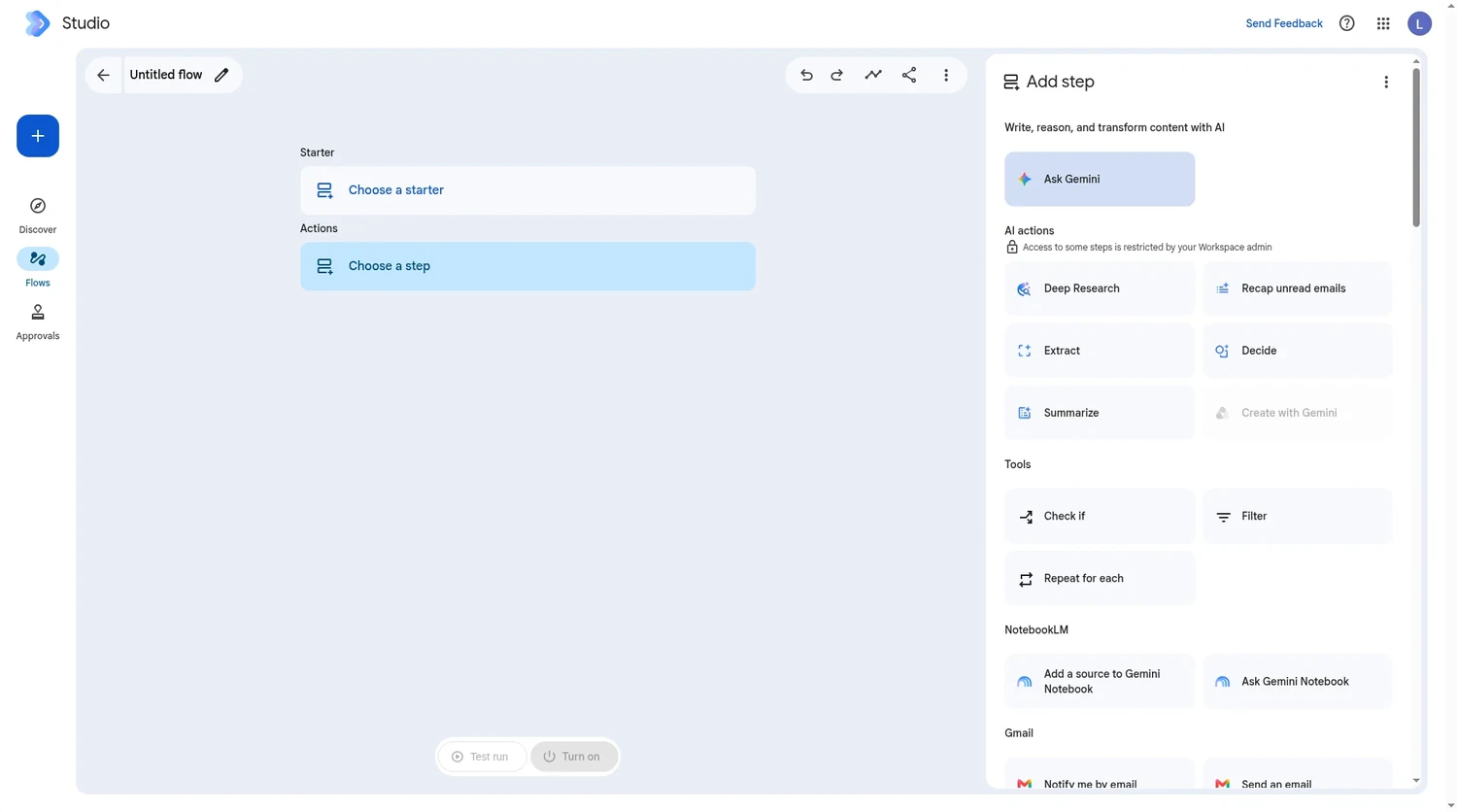
Our take: start with an email chore. Labeling or summarizing incoming mail is low risk, and within a day you'll know whether the flow saves you time.
New: pause a flow with the Wait until step
On November 10, 2026, Google announced the Wait until step. It pauses a flow and picks it back up later, either at a date and time you choose or after a set amount of time.
Before this, any sequence with a delay had to be split into separate scheduled flows. A follow-up email a few days after a customer meeting, for example, or a team digest held until Monday morning. Now the whole sequence fits in one flow, and you can put the pause anywhere, including inside Check if branches and Repeat for each loops.
| Option | What you set | Limit | Google's example |
|---|---|---|---|
| Specific day next week | Day of the week, time of day, time zone | The coming week | Continue next Monday at 8 AM |
| Specific day and time | Days to wait (0 to 13), time of day, time zone | 13 days ahead | Wait 3 days, then follow up at 5 PM |
| Set duration | A number in hours, minutes, or seconds | 14 days total | Pause for 30 minutes |
Sources: the Google Workspace Updates announcement and the Wait until Help Center article, checked November 10, 2026.
Google's own example fits a small business well. When you add a new hire to an onboarding tracker in Google Sheets, the flow sends a welcome email right away. Then it waits three days and checks on their progress in Google Chat.
While a flow is paused, the Activity tab in Studio shows when it will resume and in which time zone. Later steps can use the wait itself as data through three variables: Wait start time, Wait end time, and Wait time in seconds.
There's no admin setting for Wait until. It started rolling out on November 9, 2026 to both Rapid Release and Scheduled Release domains, and Google expects it to show up within 1 to 3 days.
Our take: the 14-day cap matters. A reminder 30 days before a contract renews still needs its own scheduled flow.
New: skills in Google Workspace and Studio
Skills are reusable, custom instructions that tell Gemini how your team does things. They can hold your team's rules and templates, plus links to reference files in Drive. Google first announced skills in September 2026. On November 10, it said they're rolling out across Workspace Studio and the Workspace apps.
How you make a skill
In Studio, click Skills, then describe what you want or pick a template. You can also edit the skill's Markdown file (SKILL.md) directly. Before you turn a skill on, test it on a sample email, document, or presentation.
Google Docs has a Skill Builder, so a group can draft a skill in a shared doc. When everyone agrees, each person clicks Make this skill in Studio to get their own copy. You can also ask Gemini in Gmail, Docs, Slides, Drive, or Chat to create a skill without leaving the app.
One catch: you can't attach a file from your computer. Save reference files like a price sheet or style guide in Drive and paste their links into the skill's instructions.
How you use one
Once a skill is on, Gemini in Gmail, Docs, Slides, Drive, and Chat can apply it on its own when it fits your prompt. Or type @ and the skill's name to call it directly. You can combine several skills in one request.
How skills and flows work together
For automation, this is the part we care about most. A flow can use a skill through the Ask Gemini with skills step, so an automated reply follows your brand guidelines. A skill can also start a flow that begins with a Start manually or On a schedule starter.
Google's skills Help Center article gives an example. A skill reads the open email thread, pulls out the customer's name, and passes it to a Sales CRM flow that handles the rest.
If you built flows around Gems, you can no longer add new Ask a Gem steps. Google explains how to replace Gems with skills in Studio flows.
What to know before you start
- Skills aren't available in Google Sheets or Google Meet yet, and they only work with English prompts and instructions.
- Sharing a skill gives the other person their own copy. Your later edits won't change it, and they'll need access to any Drive files the skill links to.
- Skills in Workspace don't sync with skills or Gems in the Gemini app. Both use the SKILL.md format, so you can copy instructions between them by hand.
- A skill guides what Gemini can already do in an app. It doesn't add new abilities.
- Skills are for users 18 and older.
Rapid Release domains started getting skills on November 9, 2026. Scheduled Release domains start on November 30, 2026. Each rollout can take up to 15 days, so don't worry if you don't see skills yet.
Our take: if your team already keeps a style guide or checklist in a Google Doc, most of your first skill is written. We keep our own writing checklist as a Markdown file in Drive, and it's the first thing we'd turn into a skill.
Which plans include Studio, Wait until, and skills?
| Feature | Business | Enterprise | Education |
|---|---|---|---|
| Workspace Studio | All Business plans | All Enterprise plans | Not stated on Google's Studio page |
| Wait until step | Starter, Standard, Plus | Standard, Plus | Fundamentals, Standard, Plus, plus the Google AI Pro for Education and Teaching and Learning add-ons |
| Skills | Starter, Standard, Plus | Starter, Standard, Plus | Google AI Pro for Education add-on |
Both updates are also available with the AI Expanded Access add-on. To compare what each plan costs, see our guide to Google Workspace pricing by plan or try the Google Workspace plan picker.
What about privacy and admin controls?
Google's Studio FAQ says customer data stays the customer's property and isn't used for advertising. Data processed in Studio isn't used to train Google's general AI models outside your domain. A flow can only reach data the person who runs it already has permission to see, and Studio won't override DLP controls for services like Drive.
Skills are on by default for eligible editions. Admins can turn skills off for the whole domain, an organizational unit, or a group. Sharing skills outside the company follows your Studio sharing settings, and Studio log events in the Admin console now record skill activity for audits.
Is Google Workspace Studio worth trying?
Yes, if you're already on a Business or Enterprise plan, because Studio comes with it. Pick one email chore, build a flow from a template, and check the Activity tab for a week. Add a Wait until step when you need a follow-up, and write your first skill from a style guide you already have.
If you aren't on Workspace yet, Studio is one more thing to weigh. Our verdict on whether Google Workspace is worth it for a small business covers the rest, and our Gemini for Google Workspace overview explains the AI features Studio builds on.
Sources checked November 10, 2026: Google Workspace Studio, Wait until announcement, skills announcement, Wait until Help, and skills Help.
Frequently asked questions
Is Google Workspace Studio free?
Google says Studio is included with Google Workspace Business and Enterprise plans, and its Studio page doesn't list a separate price. You need one of those plans to use it.
What's the difference between Google Workspace Studio and Google AI Studio?
Workspace Studio automates work inside Gmail, Chat, Drive, and other Workspace apps, and it's built for everyday users. Google AI Studio is a web tool for developers who want to prototype apps with Gemini.
Was Google Workspace Studio called Workspace Flows?
Yes. Google describes Studio as an evolution of the features it first released in alpha as Google Workspace Flows. The automations you build in Studio are still called flows.
How long can a Workspace Studio flow wait?
Up to 14 days. The Specific day and time option can schedule up to 13 days ahead, and the Set duration option adds up to 14 days in hours, minutes, or seconds.
Do skills replace Gems in Workspace Studio?
In Studio flows, yes. You can no longer add new Ask a Gem steps, and Google's Help Center explains how to replace them with skills. Google also plans to convert remaining Gems to draft skills in 2027, but only in the Gemini app, not in Workspace Studio.
Can an admin turn off skills?
Yes. Skills are on by default for eligible editions, and admins can turn them off for the whole domain, an organizational unit, or a group in the Admin console.