
Try Google Workspace For Free
With Up to 10 Users
Google Workspace is an AI-powered collaboration and productivity solution for a constantly changing work environment
Millions of businesses, ranging in size from one person
to over 55,000 users, subscribe to Google Workspace (formerly G Suite)
Business Productivity Tools

The Google Workspace email and apps experience will be almost identical for anyone who has used consumer Gmail and its related productivity tools. Applications within the Workspace platform include:
- Gemini – Google’s generative AI assistant, built into Gmail, Docs, Sheets, Slides, and Meet
- Gmail – includes Tasks, Contacts, and Keep
- Calendar – with built-in online appointment booking
- Docs – a sophisticated document editor with pageless functionality
- Sheets – powerful spreadsheets that can connect to external data sources
- Slides – presentations that can include audio, video, and charts from Sheets
- Vids – create AI-assisted videos for training, announcements, and updates
- Drawings – quickly create diagrams that you can share or insert into Docs
- Drive – secure file sharing with sophisticated admin controls
- Meet – video conferencing, all inside the browser
- Chat – instant messaging with anyone who has a Google account
- Spaces – collaborate with team members on a wide variety of topics
- Forms – for polls, surveys, and website visitor conversion to leads
- Sites – create microsites or intranets to share content internally or publicly
- My Maps – publicly share and embed maps with pins of customer locations, for example
- Voice – an optional cloud-based telephone system for your organization (not included with base price)
Your users can access these software apps from anywhere on their mobile devices. Suppose users need to send and receive files in Microsoft formats, such as Excel spreadsheets, Word documents, and PowerPoint presentations. In that case, Google Workspace allows for converting to and from those file formats in almost all cases.
Administrators can get support from an online help center, community experts, chatbots, and customer service representatives.


How Google handles your business’s data
Google has a cloud computing infrastructure with a large-scale commitment to reliability, privacy, security, compliance, and transparency. The company employs a large, dedicated team of security and privacy engineers focused on protecting customer data.
Billions of people use Google across Workspace, consumer Gmail, YouTube, Search, and other applications. So, Google has had to build a secure and scalable global infrastructure.
For a deep dive into Google Workspace security, refer to Google’s security white paper.
According to IT service provider sources, Workspace customers have not reported email account breaches from MFA-bypass schemes, such as session cookie theft, a security issue affecting Google’s most significant competitor.
Financial Benefits
A February 2026 Forrester study commissioned by Google measured the financial benefits of Google Workspace, including its built-in Gemini AI.
The study reported a 416% ROI and a net present value of $123.7 million over three years for a composite organization.
Free Trial: Enter or Request a Domain
During the free trial signup process, Google will ask you to enter a domain you own or purchase one.
If you enter an existing domain name, that does not mean you are committing to linking that domain to Google Workspace.
If you do not yet have a domain for your business but want to get one, you can request a domain during the signup process. A form lets you search for a domain name.
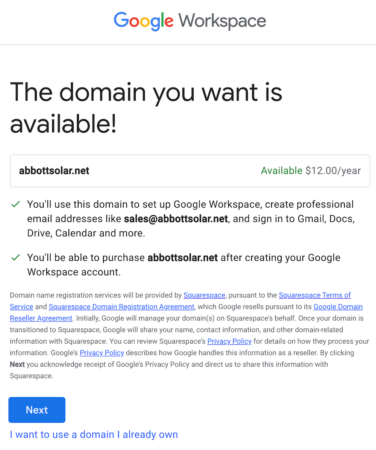
Pricing through Squarespace, which acquired Google Domains and for which Google now acts as a reseller, starts at competitive annual rates. If you decide to buy a domain at this point, you will need to enter your credit card information.
Alternatively, you can use a domain registered with GoDaddy, Namecheap, or another registrar.
Whether you have established business email addresses or are planning to transition from Gmail, Yahoo! Mail, or Comcast mail to corporate email addresses, you’ll find that Google Workspace is an easy-to-use and productive experience for your users.
During the Workspace trial, you can go into the Admin Console to add users, assign roles, and install add-ons from the Google Workspace Marketplace, a store for third-party apps.
Is Google Workspace Right For Your Size Company?
Businesses of all scales, from sole proprietors to large enterprises, utilize Google Workspace.
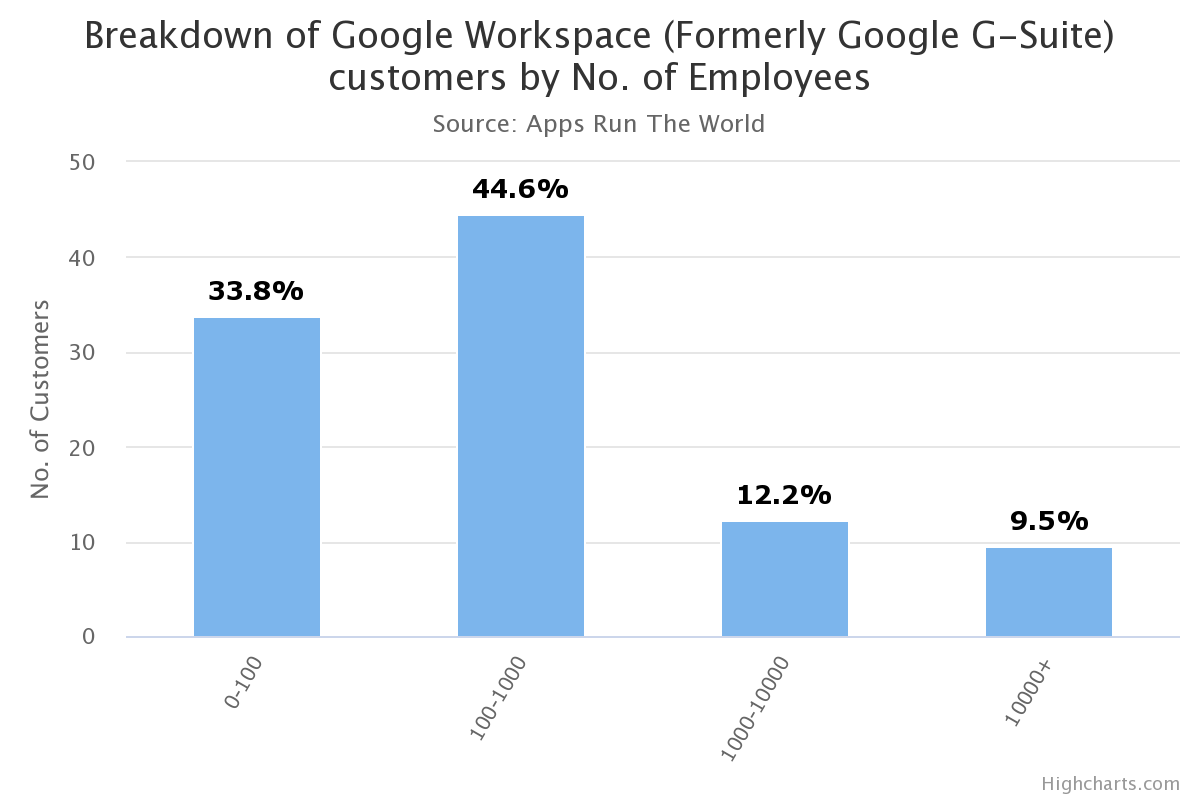
The largest customer segment consists of companies with between 100 and 1,000 employees, followed by organizations with fewer than 100 employees.
join the millions of businesses that rely on google workspace
The Per-user Cost at the End of the Free Trial
There are four Google Workspace (formerly G Suite) pricing plans. The total price is based on the number of users.
- Business Starter – USD 8.40 per user per month, USD 7 per user per month on an annual plan
- Business Standard – USD 16.80 per user per month, USD 14 per user per month on an annual plan
- Business Plus – USD 26.40 per user per month, USD 22 per user per month on an annual plan
- Enterprise – custom pricing with no user cap (the Business plans are limited to 300 users)
Every Business and Enterprise plan now includes Gemini, Google’s built-in AI assistant, at no extra cost. You can use AI to draft emails, summarize documents, build spreadsheet formulas, and take meeting notes.
Each successive Workspace edition includes more storage and features. With the Flexible Plan, the default billing option for the first three editions, users can be removed at any time without penalty.
A reason to consider the Business Standard edition is that it provides 2 TB of pooled storage per user. By installing a Google Drive app on their local machines, users can back up all their essential information to the cloud. A separate subscription to a third-party cloud backup solution is not needed.
After you sign up for a Google Workspace trial, up to 10 users can use the account to explore all the features of Google Workspace, including business email, online storage, and Gemini AI. Google Meet and Google Chat can also be tested.
Free editions
Google has separate pricing for nonprofits, including a free edition. Google Workspace for Education Fundamentals is available free of charge for qualifying institutions.
Migrating from other platforms
If you need help migrating email, calendar, contacts, and more from other platforms, tools, and data migration experts are available. There is also an extensive partner network available for assistance with setting up and managing Google Workspace.
Frequently Asked Questions
G Suite was the previous branding for the same Google offering. G Suite was rebranded “Google Workspace” in October 2020. However, many IT professionals and end-users still use the old name “G Suite” when referring to the set of apps.
Google designed Workspace for businesses, schools, nonprofits, and other organizations. However, individuals who want to use a custom domain can sign up for Google Workspace and pay for only one license. Alternatively, single users who do not need a custom domain but need more storage and several advanced features can subscribe to Google Workspace Individual.
You can sign up for a 14-day free trial to get started with Google Workspace. You can create up to 10 user accounts for you and your team members. Then, before the trial ends, you can select one of the paid plans and connect your organization’s existing domain or purchase a new domain. Once you have started a paid subscription, you can add as many users as your business needs.
A community of Google Cloud partners is available if you need third-party assistance setting up Google Workspace user accounts, importing data, and connecting your company’s domain. First, go to the Google Cloud find-a-partner site and enter “Google Workspace” in the search field. You can narrow the results by adding your location to the left sidebar.
Yes. Since 2025, Gemini, Google’s generative AI assistant, has been built into Business and Enterprise plans at no extra cost. It can help you write in Gmail and Docs, work with data in Sheets, generate images in Slides, and take notes in Meet.