
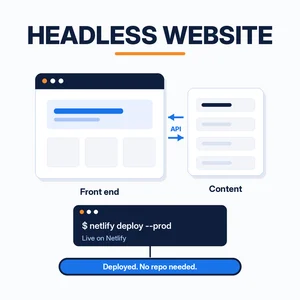
A headless website keeps its content in one place and builds the pages people see somewhere else. That split gives you fast pages and a design you fully control. It used to also mean hiring a developer and setting up a GitHub repository before anything went live.
We now build headless sites a different way. An AI agent, Grok Bot, writes the site on its own computer and pushes it to Netlify from the command line. There’s no repository in the middle. Below is what a headless site is, how it compares with a traditional CMS, and the steps we follow.
Short answer
A headless website separates the front end (the pages) from the back end (where content is stored and edited). To build one without code, describe the site to an AI agent like Grok Bot. It writes the files, runs the Netlify CLI commands for you, and sends you a private draft link. You approve the Netlify sign-in once, nothing goes live until you say “publish,” and you don’t need a GitHub repo.
Want to see it first? This short video shows the whole flow on a demo small business site.
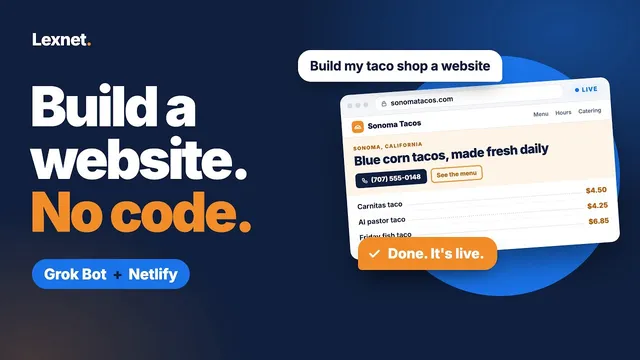
How to Build a Small Business Website With AI | Grok Bot + Netlify
A 1 minute 24 second walkthrough from Lexnet: describe your business to Grok Bot, check a private preview on Netlify, then add a contact form and your own domain.
Watch on YouTube (opens in a new tab)
What is a headless website?
In a traditional all-in-one CMS, one system does everything. It stores your posts, runs the theme, and builds each page when someone visits. That built-in front end is the “head.”
A headless site drops it. Your content sits in a headless CMS, a few Markdown or JSON files, or even a spreadsheet. A separate front end reads that content and turns it into pages, usually ahead of time, so visitors get plain files from a CDN.
A static HTML site has no CMS at all. Every page is its own file. That’s simple until you have 40 pages and need to change the phone number on each one.
So how does a headless CMS vs. a traditional CMS play out in practice? Here’s a typical all-in-one site next to the way we run lexnetcg.com today.
| Traditional all-in-one site | How we run lexnetcg.com | |
|---|---|---|
| How you edit | Log in to a dashboard and use a visual editor | Ask an AI agent in plain English; it edits the files |
| Where content lives | In a database on the web server | In page files on the agent’s computer |
| What visitors load | Pages the server builds when someone visits | Static pages built ahead of time |
| Updates to install | Core software, themes, and plugins | No CMS or plugins to update |
| Security surface | A public admin login, plugins, and a database | No admin login or database behind the pages |
| Speed | Depends on hosting, caching, and plugins | Plain files served from Netlify’s network |
| Hosting | A server or managed host you keep up to date | Netlify, plus a few Netlify Functions for things like analytics |
| How changes go live | Click Update and the change is live | A draft preview link first, then publish when you say so |
| What you need to know | The dashboard, plus plugin and theme settings | How to describe what you want and check a preview |
| Best for | Teams who edit pages daily and want a big plugin library | Owners who want fast pages and changes made for them |
Why headless website development used to need GitHub
Most headless website development guides follow the same path. Put the code in a GitHub repository, connect the repository to a host, and let the host rebuild the site each time you push a change. That’s called continuous deployment, and it works well for developer teams.
For a small business owner it’s a lot of setup. You need a GitHub account, a repository, a build configuration, and some idea of what a commit is. When something breaks, the error is in a build log you’ve never seen before.
Gemini is a good example. It’s a capable site builder: Build mode in Google AI Studio can turn a prompt into a working app. Getting that app onto Netlify is where the extra steps come in. You sync the project to GitHub and import the repository in Netlify, or export it as a ZIP and deploy the files yourself. Developers can also connect a terminal agent such as Antigravity CLI to the Netlify MCP server, which means installing and configuring tools on their own machine. None of that is hard for a developer, but it’s work the business owner ends up doing.
Netlify supports another route. Its Netlify CLI docs describe manual deploys that upload files straight from a local project folder, with no continuous deployment involved. The catch is that someone has to run the commands on a computer. That’s the part we hand off.
The key: an agent with its own computer
Grok Bot isn’t only a chat window. It has its own computer, with a browser and a command line, so it can do the hands-on part of a build: write the files, sign in to a service, and run commands.
For a Netlify site, the bot handles the commands, so you don’t have to learn or type them. It installs the Netlify CLI and runs netlify login itself. Per Netlify’s docs, that opens a browser window where you grant the CLI access to your account, and you can revoke that access later in your Netlify settings. Apart from creating your Netlify account, approving that screen is your only part. After that, the bot runs netlify deploy from its own folder each time you ask for a change. You never open a terminal.
So the source of truth is a folder on the agent’s computer, not a GitHub repo. You ask for a change in plain English, the agent edits the files, and a new preview is ready a minute later. We’re keeping the finer details of our setup for a later post, but that is the core idea.
How to build a headless website with Grok Bot and Netlify
- Describe the site. Tell Grok Bot what the business does, which pages you need, and the look you want. Include real details like hours, prices, and service areas.
- Let it build the files. The agent writes the pages and keeps editable content, such as the menu or the services list, in separate data files. That separation is what makes the site headless.
- Connect Netlify once. Create a Netlify account, then approve the sign-in screen when the bot runs
netlify loginfor you. You don’t type any commands. - Review a draft. The bot runs
netlify deployand sends you the preview link. Check it on your phone and your laptop. - Ask for changes. “Make the header darker” or “add a gallery page” is enough. Each round gets a fresh draft link.
- Publish. When you’re happy, say so. The agent runs the production deploy, and you can add your own domain in Netlify.
Prefer to do it by hand? Ask the agent for the finished folder and drag it onto Netlify Drop (Netlify Partner link; we may earn a commission if you buy a paid plan. How this works), which puts a folder of website files online from your browser.
Adding forms without a server
Contact and quote forms are usually where small sites need a back end. Netlify Forms handles that part. You add a data-netlify="true" attribute to the form, and Netlify collects the submissions when the site deploys. It can also send notifications by email, to Slack, or to a webhook.
When we built a site for the HelpfulSEOs bot, we used that to send each submission to the back end the owner picked, such as a Google Sheet or a marketing tool. If Sheets is your choice, our guide to business data sources in Google Sheets covers what to do with the data once it arrives. See Netlify’s Forms setup guide and notification options for the details.
Is a headless site right for you?
- Good fit: you want a custom design, fast pages, and changes made by asking rather than clicking through a page builder.
- Good fit: you’re tired of plugin updates and security patches on an old WordPress site.
- Less ideal: several people need to edit pages every day in a visual editor. A traditional CMS or a Google Sites page may suit them better.
- Either way: someone still has to read the drafts. An agent can make mistakes, so check every preview before you publish.
If you searched for a headless website builder, this is a different idea. There’s no builder interface to learn. The agent does the building, and you review the results.
We moved lexnetcg.com from WordPress to pre-built pages on Netlify, and we make most updates this way. For a plain-English overview of Netlify for small businesses, start with our guide to building a website with Netlify. Pointing a domain at your new site? Our MX records guide explains which DNS records to leave alone so email keeps working. Watching costs? See 6 ways to cut business technology costs.
Frequently asked questions
What is a headless website?
It’s a site where the pages visitors see are built separately from the system that stores the content. The front end reads the content through an API or at build time, so you can change the design without touching the content.
Do I need a GitHub repo to deploy a headless site on Netlify?
No. Netlify’s CLI supports manual deploys that upload files directly from a local folder. An agent with its own computer, like Grok Bot, can run those commands for you. You can also drag a built folder onto Netlify Drop.
Is a headless site the same as a static site?
Not exactly. Many headless sites are built into static pages, but a static site can also be hand-written HTML with no content source behind it. Headless describes how content and design are split.
How do form submissions work on a headless website?
With Netlify Forms, you mark the form with a data-netlify attribute and Netlify collects submissions. Notifications can go by email, to Slack, or to a webhook that passes them on to a Google Sheet or marketing tool.
Will the AI publish changes without asking me?
It doesn’t have to. Netlify’s deploy command creates a draft URL by default, and only the --prod option updates the live site. The bot runs these commands for you, so you only need to say when to publish.