
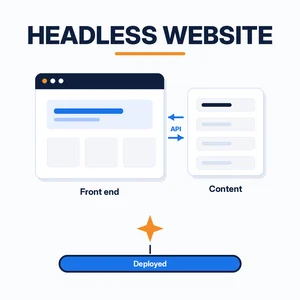
A headless website keeps its content and its design apart. The content lives in one place, such as a headless CMS, a folder of Markdown files, or a database. The pages people see are built separately and pull that content in through an API or at build time. Nothing on the front end is tied to one CMS theme.
That split used to mean hiring a developer. Now an AI assistant like Gemini can write most of the front-end code, and Netlify can host it. Here’s what a headless site is, when it makes sense, and the steps to go from a Gemini prompt to a live URL.
Short answer
A headless website is a site where the front end (the pages) is separate from the back end (where content is stored and edited). The two talk through an API. You can build the front end with an AI assistant such as Gemini in Google AI Studio, push it to GitHub, and deploy it on Netlify, which rebuilds the site each time the code or content changes.
What is a headless website?
In a traditional CMS like classic WordPress, one system does everything. It stores your posts, runs the theme, and builds each page when someone visits. The “head” is that built-in front end.
A headless setup removes the head. The CMS, or whatever holds your content, only stores and serves it. A separate front end, often written with a framework like React, Astro, or Next.js, asks for the content and decides how it looks. The same content can then feed a website and a mobile app at the same time.
A plain static HTML site sits at the other end. There’s no CMS at all. Each page is a file you edit by hand, which is simple and fast but gets tedious once you have dozens of pages.
| Headless website | Traditional CMS | Static HTML | |
|---|---|---|---|
| Where content lives | A headless CMS, Markdown files, or a database, reached by API | Inside the CMS database | Inside each HTML file |
| Who builds the pages | Your own front end (framework code) | The CMS theme | You, by hand |
| Editing | Editors use the CMS; developers own the design | Editors and themes in one dashboard | Edit the files and re-upload |
| Speed and security | Usually pre-built pages on a CDN, little to attack | Depends on hosting, plugins, and updates | Fast, very little to attack |
| Best for | Sites that need custom design or reuse content in several places | Blogs and sites run by non-technical teams | Small sites that rarely change |
Where AI assistants fit in a headless website build
The hard part of going headless has always been the front end. Someone has to write the components, wire up the API calls, and set up the build. That’s the part AI coding assistants are good at.
Gemini can turn a plain-English description into a working app in Google AI Studio. Coding agents can also run in your terminal, edit the project, and run deploy commands for you. Netlify supports this directly. Its Netlify MCP server lets an agent create projects, deploy, and manage settings, and Netlify publishes setup guides for agents that include Google Antigravity, Claude Code, Codex, ChatGPT, and Grok.
You still decide what the site should do and check what the AI produces. Think of the assistant as a fast junior developer, not an autopilot.
How to build a headless website with Gemini and deploy it on Netlify
There are three routes. Pick the one that matches how comfortable you are with code.
Option 1: Google AI Studio, GitHub, then Netlify
- Open Build mode in Google AI Studio and describe the site: the pages, the layout, and where the content comes from (for example, a list of products in a JSON file or a headless CMS API).
- Review the preview and keep prompting until it looks right.
- Connect AI Studio to GitHub so the code lands in a repository. AI Studio can also export the project as a ZIP file.
- In Netlify, import the GitHub repository. Netlify builds and deploys it, and redeploys each time you push a change.
- If the app calls the Gemini API, add your
GEMINI_API_KEYas an environment variable in Netlify. Google notes this is required when you host an exported app somewhere other than AI Studio.
No GitHub account? Build the project locally and drag the output folder onto Netlify Drop, which works without signing up first.
Option 2: an AI coding agent in your terminal with the Netlify MCP server
- Install the Netlify CLI with
npm install -g netlify-cli(Node 24 or newer is recommended). - Connect your agent to the Netlify MCP server. For Antigravity CLI, Netlify’s setup guide uses
npx add-mcp https://netlify-mcp.netlify.app/mcp --agent=antigravity. Gemini CLI reads MCP servers from itssettings.jsonfile (see the Gemini CLI MCP docs). - Optionally add Netlify’s agent skills with
npx skills add netlify/context-and-toolsso the agent follows Netlify’s current practices. - Ask the agent to build the headless front end, then run a draft deploy with
netlify deploy. Check the draft URL before you runnetlify deploy --prod.
One thing to know: Google says Gemini CLI was replaced by Antigravity CLI for unpaid-tier and Google One users on June 18, 2026. If that’s you, use Antigravity CLI for this route.
Option 3: Netlify Agent Runners
If you’d rather skip local setup, Agent Runners run an AI agent inside Netlify. You type a prompt in the Netlify dashboard and pick an agent. Netlify’s docs list Google Antigravity, Claude Code, OpenAI Codex, and others, and its knowledge base shows a Gemini example from the CLI. Each run creates a Deploy Preview you can review before publishing. Agent Runners need a credit-based Netlify plan with AI features turned on.
Benefits and limits of a headless website
What you gain
- Pages are pre-built and served from a CDN, so they tend to load fast.
- There’s no public admin login or plugin stack on the live site for attackers to probe.
- You can change the design without touching the content, or swap the CMS without rebuilding the design.
- Every change can get its own preview link, which makes review with clients or coworkers easier.
What it costs you
- More moving parts. You manage the content source, the front-end code, and the hosting.
- Editors lose the one-click preview they had in a classic CMS unless you set one up.
- AI-written code still needs someone to read it, test it, and fix it when a library changes.
- For a five-page brochure site that rarely changes, a site builder or plain static HTML is usually simpler.
We moved this site, lexnetcg.com, from WordPress to pre-built pages on Netlify, and we use an AI assistant to make most updates. We review every change on a preview link before it goes live.
Related reading
New to Gemini? Start with our guide to Gemini in Google Workspace. If you only need a simple internal site, Google Sites may be enough. Moving a domain? Our MX records guide covers the email side.
Frequently asked questions
What does it mean to have a headless website?
It means the part of the site visitors see is separate from the system that stores your content. The front end gets content through an API or at build time, so you can redesign it or reuse the content elsewhere without changing the CMS.
Is a headless website the same as a static site?
Not exactly. Many headless websites are built into static pages, but a static site can also be hand-written HTML with no CMS. Headless describes how content and design are split. Static describes how the pages are served.
Can Gemini build a headless website for me?
Gemini can write most of the front-end code. Google AI Studio’s Build mode creates an app from a prompt and can sync it to GitHub or export it as a ZIP. You still need to review the code and connect it to your content source.
How do I deploy a Gemini-built site to Netlify?
Push the code to GitHub and import the repository in Netlify, drag a built folder onto Netlify Drop, or deploy from the terminal with the Netlify CLI. Coding agents can also deploy through the Netlify MCP server.
Do I need a headless CMS to build a headless website?
No. Content can come from Markdown files in your repository, a spreadsheet, or a database. A headless CMS such as Contentful or Sanity helps when non-technical people need to edit content.