Launched as a core Google Workspace service in 2025, Google Vids is an AI-powered video creation tool for work.
Vids works alongside other Workspace productivity tools, such as Docs, Sheets, and Slides, and includes the same collaboration features.
A new Vid can be created at https://vids.new.
Vids creates a template-based storyboard that users can edit. Alternatively, a blank Vid can be selected.
The menu controls in Google Vids will be familiar to anyone who has used Google Slides.
Google Vids Scene Components
A Vid’s scenes can include
- Text
- Tables
- Charts (including ones from Google Sheets)
- Stock images
- Your images
- AI-generated images (Nano Banana)
- AI-generated Veo video clips
- Human-like avatars (combined with Veo)
- Custom and branded avatars (Nano Banana 2)
- 2-D and 3-D cartoon avatars
- Captions
- Stock videos
- Your videos
- Screen recordings (including via the Chrome extension)
- Google Slides
- Uploaded audio
- AI-generated music (Lyria 3)
- AI voiceovers (30 voices, 24 languages)
- Your voiceovers
Here’s a Vid we created in mid-2025 on CRM data quality, comprised of seven 8-second Veo clips. Veo is available in Vids for all Google Workspace plans.
Since we generated this video, image uploads, which enable character consistency across clips, have been introduced.
Vids Avatars Meet Veo
This is another Vid we created in December 2025, after Veo was merged with avatars, making lip-sync nearly flawless.
Because compute-heavy Veo is used, there is a weekly limit on avatar generation.
In 2026, avatars learned seven new languages, and users can now create custom avatars, refining outfits, accessories, and backgrounds, then add their company logo with Nano Banana 2.
In addition to the traditional 16:9 aspect ratio used in the videos above, users can create and edit videos in vertical (9:16) and square (1:1) aspect ratios, and export them to platforms such as YouTube Shorts, Instagram Reels, TikTok, X, and LinkedIn. Vids can also publish directly to YouTube.
The Slides and Docs Connection
You can import a Google Slides presentation into Vids and add an editable AI-generated script, an AI voiceover, and background music.
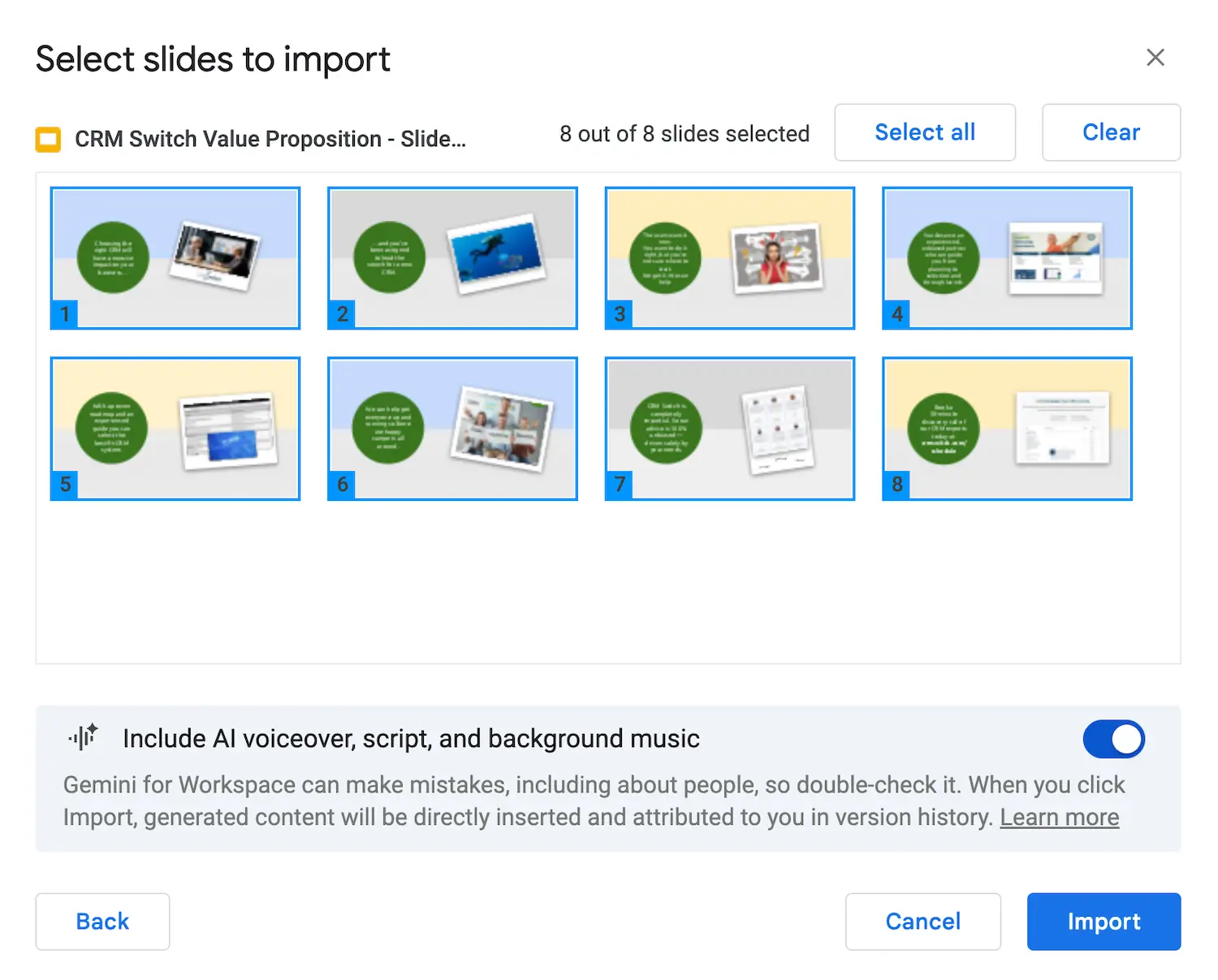
An example use case is following up after sales meetings. Rather than saving a custom Google Slides presentation as a PDF and emailing it to the prospect, the presentation can be converted into a narrated video in Google Vids for a multimodal follow-up.
Presenters can also record directly from Slides using the new Record option, which opens a Vids workflow with transcript-based editing.
Google Docs, PDFs, and Word files can now be turned into video summaries, with AI-generated scripts, narration, and visuals.
Here is the blog post you are reading turned into a video summary after converting it to a Doc using Gemini:
Google Vids Use Cases
Some of the use cases for Vids include
- Product demos
- Publicize investment opportunities
- Sales meeting follow-ups
- Brand promotions
- Event recaps
- Project updates
- Employee onboarding
- Company milestones
- Vendor outreach
- Design reviews
- Testimonials
- How-to tutorials
- Report and documentation summaries
- FAQs
- Tips & tricks
Among other use cases, Vids is an excellent way for content marketers to create new content and distribute existing content.
Duration Limits
Maximum durations were increased in February 2026.
The maximum length for a Vids project is 30 minutes.
The maximum length for any video or audio clip created directly in the Vids recording studio is 30 minutes.
Users can import video or audio clips up to 95 minutes in length (or up to 4 GB in file size).
With a steady stream of new capabilities in 2026, Google Vids is fast becoming a comprehensive AI video production app.
Want to make your first Vid?
Google Vids is part of Google Workspace, alongside Gmail, Docs, Slides, Meet, and Gemini. Start a 14-day free trial, import your next Slides deck, and turn it into a narrated video in minutes.